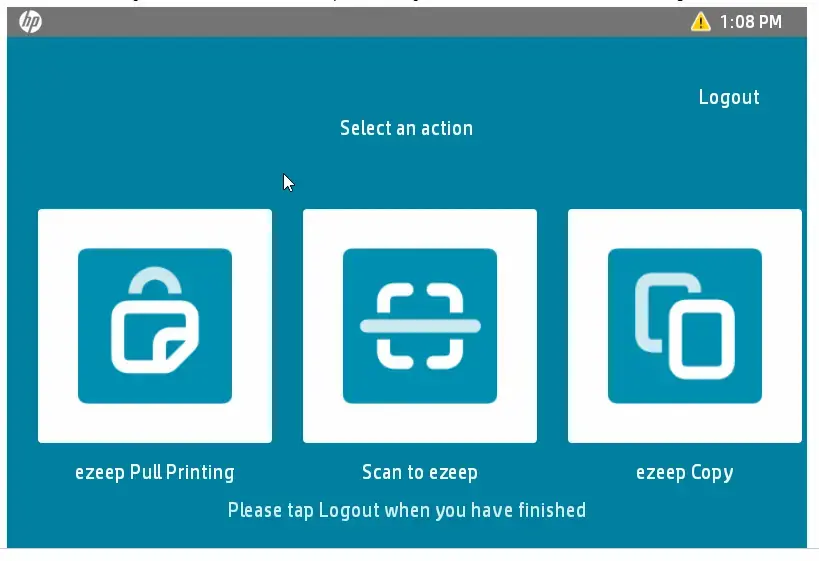
With the new ezeep app for HP Workpath, HP devices can be integrated directly into ezeep’s central, cloud-based print infrastructure
DENVER, CO, UNITED STATES, September 30, 2026 /EINPresswire.com/ — ThinPrint, provider of ezeep, the cloud-based solution for modern print and scan infrastructure management, today announced the availability of the new ezeep app for HP Workpath. This allows HP multifunction printers to be integrated directly into the existing ezeep infrastructure — without an additional scan client.
Today’s employees work remotely, in hybrid setups, on the go, or from coworking spaces — and expect the same flexibility they are already accustomed to from other IT systems. For IT leaders, this creates a growing challenge: printing and scanning can no longer be tied to individual locations, devices, or local print servers. What’s needed instead is centralized, device-independent control that supports these flexible working models rather than holding them back.
This is exactly where ezeep comes in: the platform connects endpoint devices and application types independently of the manufacturer — from traditional laptops to mobile devices to AI-powered applications that interact directly with the print infrastructure via MCP (Model Context Protocol). Management is centralized and cloud-based, with security built into the architecture from the ground up by ISO 27001-certified provider ThinPrint.
HP printers become part of this infrastructure
With the new ezeep app for HP Workpath, HP multifunction printers are now also integrated into this infrastructure. IT teams benefit from central functions available directly on the HP device’s control panel:
• Pull Printing: Print jobs are held securely in the cloud until they are released and picked up at the desired device — regardless of location or endpoint
• Scan-to-Cloud: Documents are transferred directly to the correct target systems, without detours via email or USB
• Copy tracking: Complete transparency and cost control across the entire device fleet
• NFC authentication: Release directly at the control panel, without additional hardware on the device
For IT leaders, integrating HP devices creates no additional administrative burden, as this device class fits seamlessly into the already existing central management.
“Anyone planning their print infrastructure today is no longer planning for a single office building, but for a distributed, flexible working world with changing requirements. The fact that HP printers are now part of the ezeep world is another important building block in our vision — and great news for anyone who owns HP devices or wants to integrate them into their printer fleet,” said Karen Thulmann, product manager ezeep at ThinPrint.
Anyone who wants to use the new ezeep app needs an ezeep Business or Enterprise subscription with the Pull Printing policy enabled, as well as an HP device that appears on the list of Workpath-compatible devices.
The article “ezeep App for HP Printers” in the knowledge base explains pairing, user registration, and enabling scan and copy functions — each with a video
for every step: ezeep App for HP Printers : ezeep
Silke Kluckert
ThinPrint GmbH
email us here
+49 30 408198725
Visit us on social media:
LinkedIn
Legal Disclaimer:
EIN Presswire provides this news content “as is” without warranty of any kind. We do not accept any responsibility or liability
for the accuracy, content, images, videos, licenses, completeness, legality, or reliability of the information contained in this
article. If you have any complaints or copyright issues related to this article, kindly contact the author above.

Media gallery